How to install SSL Certificate crt files to GoDaddy using cPanel
A short guide for installing SSL certificates to GoDaddy cPanel.
May 27, 2023 - 6 min read
Make sure your GoDaddy website is secured using SSL certificates
Step 1: Download the new certificate
If you have purchased the SSL certificate through GoDaddy the certificate files can be downloaded from the SSL Certificates manager.

Open the SSL Certificates manager

Download the new certificate zip file
Step 2: Open cPanel admin
SSL certificates can be added and modified via the cPanel Admin dashboard.

Open the GoDaddy Web Hosting manager

Open cPanel Admin

cPanel Admin dashboard
Step 3: Open the SSL Certificate manager
SSL certificates can be accessed in the Security section of the cPanel Admin dashboard.
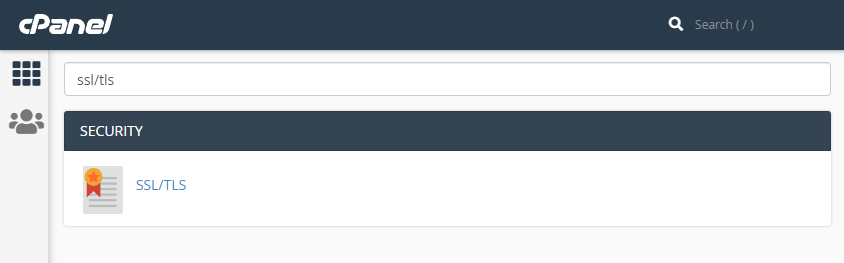
Open SSL/TLS in cPanel Admin
Step 4: Upload the certificate
The zip file containing the new SSL certificate must be extracted. The crt file can then be uploaded using cPanel Admin.
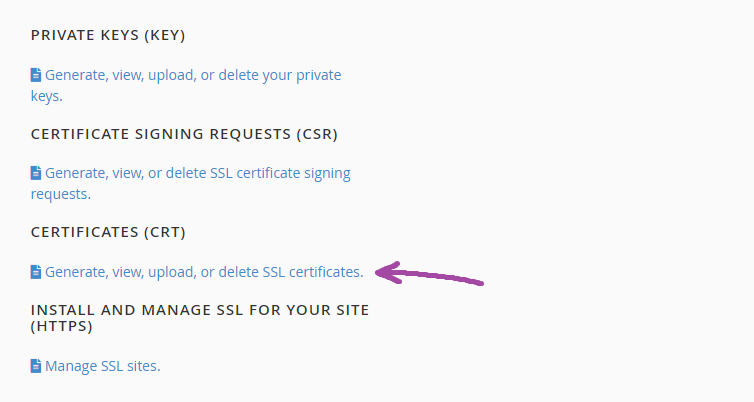
Open the CERTIFICATES (CRT) window

1. Choose the crt certificate file and 2. press upload

Extract and upload the crt file
Step 5: Verify the certificate has been uploaded
Check the Certificates on Server list to ensure the new certificate is visible.

Verify the new certificate and expiration date
Step 6: Install the certificate
Open Manage SSL Sites and install the new SSL certificate using the Browse Certificates button.

Open the INSTALL AND MANAGE SSL FOR YOUR SITE (HTTPS) window

Install the new SSL Certificate by pressing Browse Certificates

Select the new certificate from the list

Press the Install Certificate button
Step 7: Verify the certificate has been installed
After uploading and installing the new SSL certificate verify it has been assigned using the INSTALL AND MANAGE SSL FOR YOUR SITE (HTTPS) window. Consider deleting the old certificates from the CERTIFICATES (CRT) window. It is also worth loading the website to make sure it's operational and no privacy or security errors are activated.

Verify the new website SSL expiry date
Step 8: Delete old certificates
Consider deleting the old and unused certificates from the CERTIFICATES (CRT) window.

Delete certificates from the CERTIFICATES (CRT) window